
Why client work needs a board, not a to-do list
A flat to-do list tells you what's left, but not where anything is. With client work that distinction matters: a task that's "in progress" and a task that's "waiting on your review" need completely different actions from you, and a client asking "where are we?" wants the second answer, not a checklist.
Kanban makes state visible. Instead of a list of undifferentiated tasks, you see columns — and the shape of those columns tells you the health of the project in a glance. Everything stuck in one column is a signal. A board you can read in three seconds is worth more than a perfectly groomed list you have to think about.
The four columns and what they mean
Every project in ClientDeck has the same four-column board. Keeping the columns consistent across projects is a feature, not a limitation — you learn to read any project instantly:
- To Do — agreed work that hasn't started. Your backlog for this project.
- In Progress — what's actively being worked on right now. This column should stay short.
- In Review — work that's done but waiting on a check, approval, or client sign-off. This is the column most to-do lists are missing, and it's where client work actually lives.
- Done — finished and accepted. Visible proof of progress for you and the client.
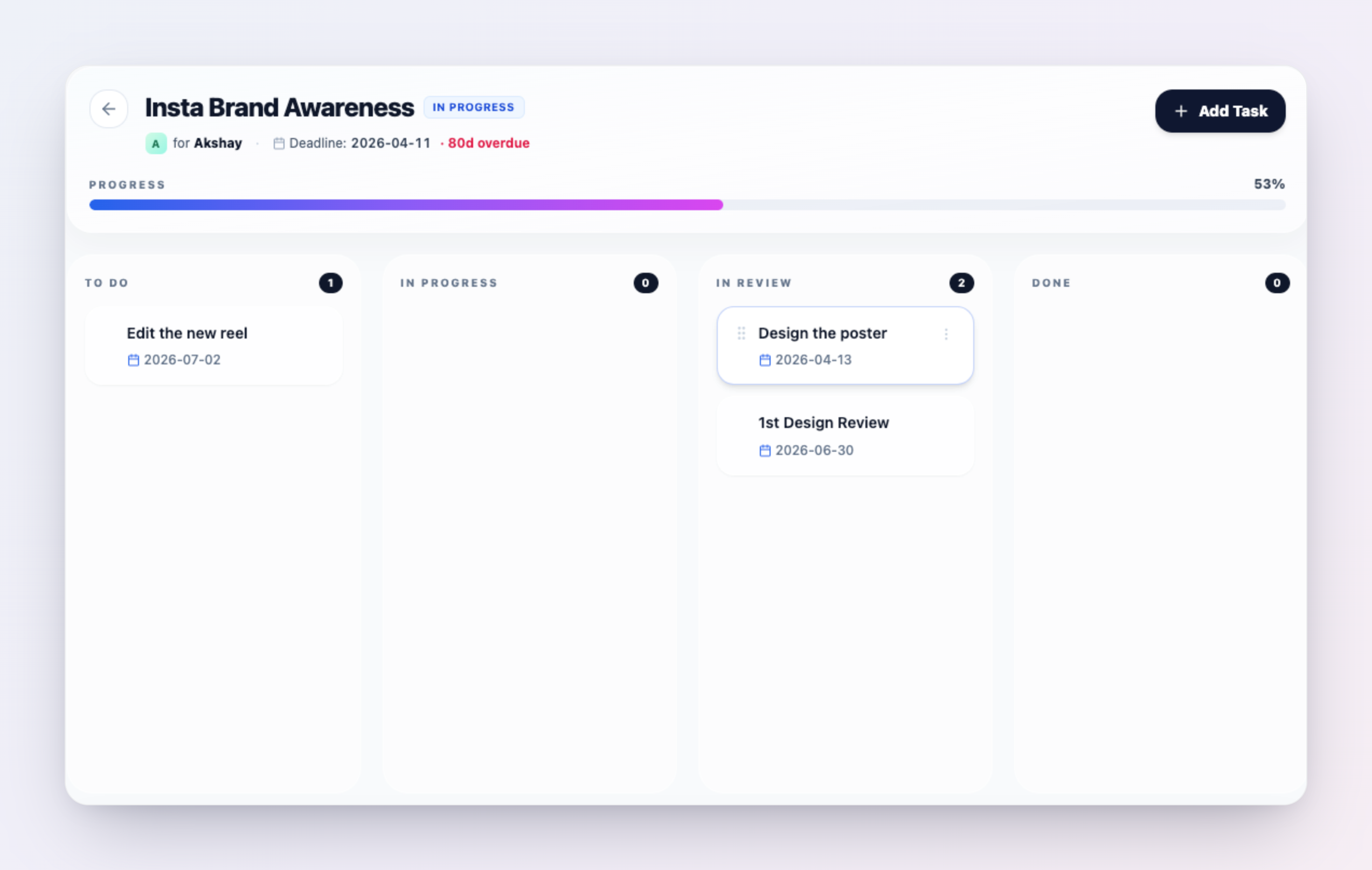
One board per project keeps client work separate
A common mistake is running all your work on one giant board. For client work, one board per project is the better model: each client's work stays in its own container, the columns mean the same thing everywhere, and you can answer "where are we on the Acme site?" without filtering noise from five other clients.
Because each board belongs to a project — and each project belongs to one client — the board is automatically scoped to the right relationship. You're never untangling whose task is whose.
How tasks flow across the board
Moving work forward is meant to be physical and fast:
- Add a task from inside the project with a title, and optionally a due date and an assignee.
- Drag a card from one column to the next as the work progresses — or edit the task to change any field.
- Mark it done from the dashboard — active tasks surface on your Today agenda, where you can move one straight to Done without opening the project.
The goal is that updating the board costs almost nothing, because a board only tells the truth if it's kept current.
Keep the board honest (so it doesn't become chaos)
Kanban turns into chaos the same way every time: too much in progress at once, and a review column that becomes a graveyard. A few habits prevent it:
- Limit work in progress. If everything is "In Progress," nothing is. Start fewer tasks and finish them before pulling new ones.
- Treat In Review as active work, not a parking lot. A card sitting in review is blocked, not done — chase the approval or the client sign-off.
- Make Done mean accepted. Don't move a card to Done until the work is actually approved, so the column stays trustworthy.
- Update as you go, not weekly. A board groomed once a week is fiction by Wednesday. Move cards in real time.
Connect the board to the rest of the work
A ClientDeck board isn't an island — it feeds the things clients and you actually care about:
- Project status reflects the board. As tasks move toward Done, the project's overall status updates from the distribution of work, so your pipeline view stays accurate without manual upkeep.
- Clients see progress, not your raw board. The client portal shows the updates you choose to publish and the next milestone — a calm, curated view — while the working board stays yours. (Updates are agency-published only; nothing leaks automatically.)
- Tasks sit next to time and money. Because the board lives inside the project, the same screen carries the budget, billable value, and unbilled total — so delivery and billable hours live together.
Kanban for solo freelancers vs agencies
Solo, the board is mostly for you — a way to hold every client's state in one glance without keeping it in your head. For agencies, the assignee field turns the same board into lightweight team coordination: everyone can see who owns what and what's waiting on review, without a status meeting. The columns don't change; the board just scales with you. New to ClientDeck projects? See the projects documentation, or read why ClientDeck fits agencies.
Frequently asked questions
A Kanban board is a visual tool that shows tasks as cards moving through columns that represent stages of work. You see the state of everything at once and move a card forward as its task progresses.
Every project has four columns: To Do, In Progress, In Review, and Done. You move a task by dragging its card between columns or by editing the task.
Yes. Kanban is especially good for client work because it makes the "waiting on review or approval" stage visible — the stage most plain to-do lists miss — and lets you answer "where are we?" at a glance.
No. The working board stays on your side. Clients see the updates you choose to publish and the project's next milestone in their portal — a calm, curated view rather than the raw task board.
Yes. Projects and their four-column task boards are available on every ClientDeck plan, including the free plan (which allows up to three active projects).
Run every project from one clear board.
Start free with ClientDeck