
The problem a client portal solves
Think about how a typical project actually communicates: the proposal is in one email thread, the invoice in another, the latest files in a third (or in WhatsApp, or a Drive link someone lost), and status updates happen whenever the client remembers to ask. Every handoff is a chance for something to get buried.
That chaos has real costs. Clients chase you for documents you already sent. Invoices sit unseen at the bottom of an inbox. You look less organized than you are. And you spend hours each week as a human search engine, re-finding and re-sending things.
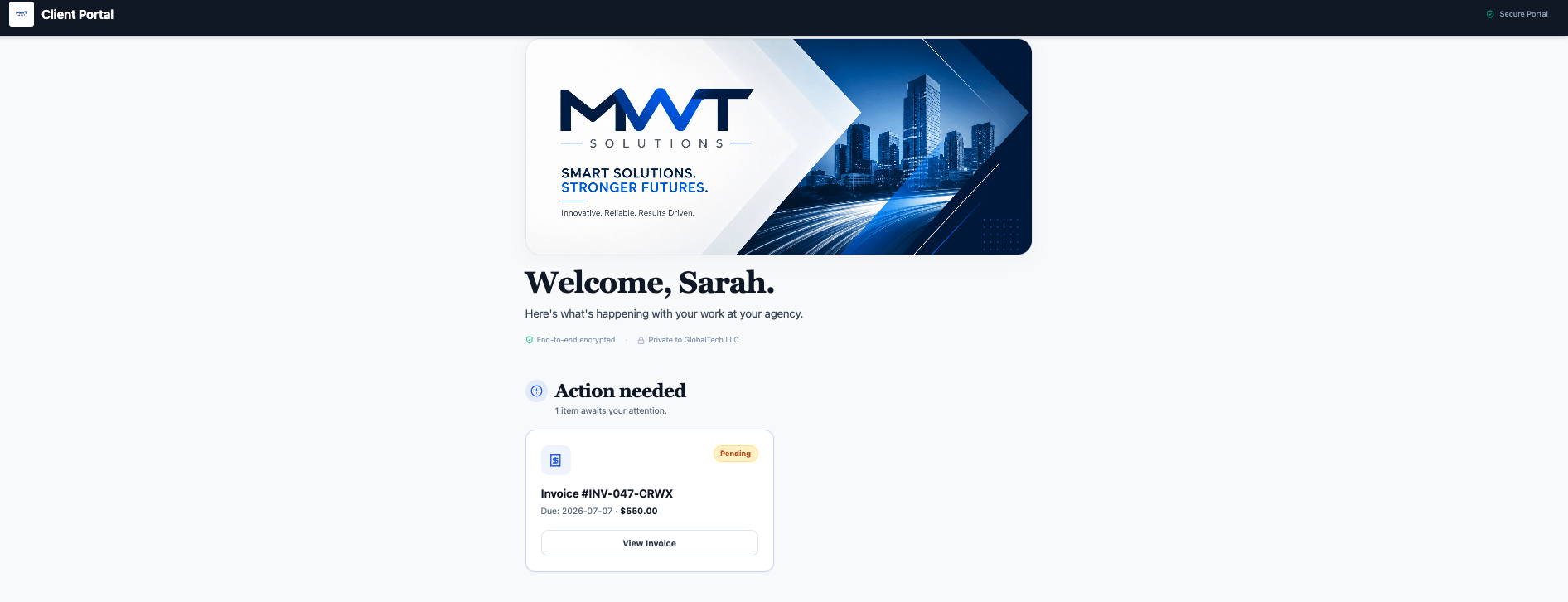
A client portal collapses all of that into one link. The client opens it and everything is there, current, and in your branding.
What a client portal actually contains
A good portal is organized around what the client needs to see and do. In ClientDeck, each client's portal can include:
- Invoices & Payments — view invoices and pay online directly from the portal.
- Proposals — review, e-sign, or decline proposals without printing or emailing anything.
- Project Boards & Updates — see project progress and the updates you publish, so clients stop asking "where are we?"
- Shared Files & Assets — a tidy file hub instead of email attachments; clients can download deliverables and upload their own.
- AI Reports — share clear, professional reports of the work and results.
- A discussion thread — keep conversation attached to the work instead of lost in email.
- A branded welcome card — your logo, colors, and a personal greeting set the tone.
Crucially, you control exactly what each client sees with per-client permissions — show one client invoices and files only, give another the full project board.
Client portal vs email, attachments, and shared drives
The fastest way to understand a client portal is to compare it to the tools it replaces. Email and a shared Drive folder can each do part of the job, but neither gives the client one current, controlled, branded view of the relationship:
| What you need to do | Email & attachments | Shared Drive folder | Client portal |
|---|---|---|---|
| Find the latest invoice or file | Scroll through threads | Hunt through folders | One organized place, always current |
| Let the client pay | Paste a separate payment link | Not possible | Pay button right on the invoice |
| Control who sees what | Forward-and-hope | Folder-level at best | Per-client permissions you set |
| Pull back access later | Impossible once sent | Manual and easy to miss | Revoke the link instantly |
| Look like a real business | Generic inbox | Generic Drive UI | Your branding end to end |
That last column is the whole point: a portal isn't a new place to store things, it's a single client-facing surface where everything is current, payable, permissioned, and branded.
Why freelancers (not just big agencies) need one
The instinct is that portals are an "agency thing." The opposite is true: a portal is how a solo freelancer looks like an agency. Three reasons it matters more the smaller you are:
- It gets you paid faster. When the invoice lives in a portal with a pay button — not buried in email — it gets seen and settled sooner.
- It saves your hours. Every "can you resend that?" you eliminate is time back. At freelance scale, admin time is billable time lost.
- It signals professionalism. A branded portal instantly reads as "this person runs a real business," which supports higher rates and more trust.
Who actually uses client portals (and for what)
Client portals aren't tied to one industry — they fit anyone who serves multiple clients and is tired of being the human search engine for their own work:
- Freelancers and solo consultants — one polished hub per client makes a one-person business read like a studio. (See why ClientDeck fits freelancers.)
- Agencies and studios — give every client consistent, branded visibility into projects, approvals, and invoices without a flood of status emails. (See ClientDeck for agencies.)
- Designers and creatives — deliver finals, collect feedback, and get proposals e-signed without zipping files back and forth.
- Marketers and SEO consultants — publish reports and progress updates clients can actually find, instead of re-explaining results every month.
- Developers and technical services — keep scopes, invoices, and shared files in one auditable place per client.
How clients access it (and how it stays private)
Each portal is a unique, private link. You share it with one client; only that link opens that client's portal, and you can revoke access at any time. Combined with per-client permissions, that means a client sees their own information and nothing else — far safer than firing documents around as email attachments that live forever in inboxes.
What to look for in a client portal
Not every "client portal" feature is equal. If you're evaluating client portal software, these are the things that actually change how clients experience you:
- Your branding, not the vendor's — your logo, colors, and ideally a custom domain, so the portal feels like your product.
- Per-client permissions — control exactly what each client sees, rather than one-size-fits-all access.
- Built-in payments — invoices clients can pay inside the portal, so billing isn't a separate step. (How to choose a gateway.)
- A real file hub — organized, dated, two-way file sharing instead of attachments. (More on secure file sharing.)
- Revocable, private access — a unique link you can switch off the moment an engagement ends.
- A price that scales — a free or low entry tier so you can start with a single client and grow.
ClientDeck was built around exactly this checklist — branded portals with per-client permissions, payable invoices, a shared files hub, and revocable links — on every plan. For a sense of what a polished setup looks like, see these client portal examples.
How to set up a client portal in ClientDeck
- Create a client and generate their portal.
- Choose what that client can see using the permission toggles (Invoices & Payments, Project Boards, AI Reports, Shared Files & Assets).
- Add your branding so it looks like you, then share the private link.
ClientDeck includes client portals on every plan — 1 portal on Free, 10 on Plus, and unlimited on Pro — so you can start with a single client and scale up. To make the portal fully your own with your logo, colors, and a custom domain, see how to build a white-label client portal. And if you run a solo practice, here's why ClientDeck fits freelancers.
Frequently asked questions
It's one private, branded web page per client where they can see and act on everything related to your work — invoices, proposals, projects, files, and updates — instead of digging through email.
Yes. It gets invoices paid faster, eliminates repetitive "can you resend that" admin, and makes a solo freelancer look as organized as an agency — which supports higher rates.
You share a unique private portal link with each client. Only that link opens their portal, you control what they can see, and you can revoke access at any time.
A CRM is an internal tool for managing your contacts, leads, and sales pipeline. A client portal is the client-facing space where each client sees and acts on their own invoices, files, projects, and proposals. Some platforms, including ClientDeck, combine both so the client-facing portal is powered by the same client records you manage internally.
At a minimum: a branded welcome, invoices the client can pay, an organized file hub, and per-client permissions controlling what each client sees. Most good portals also offer proposals to e-sign, project updates, and shared reports.
A portal is more secure than emailing attachments. Each client's portal opens only through a unique private link with per-client permissions you set, and you can revoke that access at any time — so a client only ever sees their own information, and nothing keeps living in inboxes after a project ends.
ClientDeck includes client portals on every plan — 1 on Free, 10 on Plus, and unlimited on Pro.
Give every client one organized place.
Start free with ClientDeck